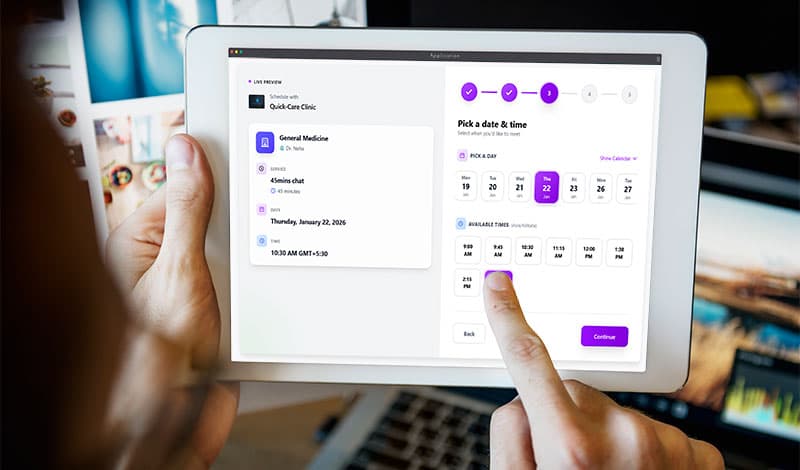
Suppose you are managing a clinic and planning to adopt digital solutions for online appointment booking. It may appear complex at first, don't worry—it's simpler than it seems. In reality, this system is efficient for managing daily schedules effortlessly.
This guide shows how the technology works for you. You will learn how automated scheduling saves your time and helps you manage your daily practice more effectively.
By the end, you'll feel confident exploring options. Let's dive in!
What Is an Online Doctor's Appointment Booking System?
A booking system is a digital tool for doctors that, on one hand, schedules appointments automatically, and on the other, allows patients to book their visits at available times online. As a result, neither phone calls nor long queues.
Patients visit the booking link via the Facebook page, GBP (Google Business Page), or the website. Then pick a doctor, see available slots, and confirm instantly. Otherwise, the doctors or receptionists juggled attending calls and managing queues during peak hours. The system updates Google calendar automatically as GetSetTime allows. It works like an always-on receptionist.
These systems come as web apps, mobile apps, or embedded pages. Popular ones integrated with online payments, via Card, online banking, or UPI(Only in India), and also support the regional languages apart from English.
Beginners start with free trials—no tech skills needed.
Key parts include:
- Patient portal: Easy slot picker.
- Doctor dashboard: View and manage bookings.
- Notifications: SMS or email alerts.
Short paragraphs keep it simple. You get the idea—it's a bridge between patients and doctors online.
Why Does It Matters in Today's Populated City or Nation?
e.g., India's fast-moving healthcare scene. With 1.4 billion people, clinics face massive demand. Urban doctors in cities like Chandigarh, Delhi, Pune, or Chennai see 100+ patients daily. Rural areas struggle with travel.
Time Sevvy for everyone. Patients skip long waiting calls. Doctors cut no-shows by 40% with reminders—by this schedule, they could manage their schedule and utilise time efficiently.
Easy accessibility - Patients can book from home to visit the clinic in person or for online wellness consultations (e.g., yoga therapy sessions, diet plans). Online booking shines for job-oriented people, making it easy to book a slot that fits their schedule.
Analyse and handle growth: Small clinics scale up. They can manage the schedule effectively by analysing previous booking records to better utilise available free slots.
Reassures beginners: No upfront costs, even free for the first few months to set up and adapt to the existing working environment. Many plans may start at ₹500/month. Then, you pay only for the requirements of you and your team's needs, based on the number of clients and the features you choose (integration with apps, online payments, cloud storage, branding, etc.).
How It Works: Simple Step-by-Step
No worries, simple process. Here's how it will fit into your daily routine.
Step 1: Doctor Sets It Up
You pick a tool or app( GetSetTime). To create the workspace, you need to sign up via email id(official or general), with other details: personal name, clinic name, address, speciality like "general check-up", "ortho", or "diabetes consult." Link your phone and calendar. It all takes almost 15 minutes.
Step 2: Patient Books Online
A patient searches the clinic on Google via the name "Dr. Singh clinic Mohali" or "(speciality service) near me". They find and click on the booking link (shared on GBP, website, and social media). They see available slots for the visiting day, then pick a suitable one, enter details, and pay online if needed. Done:
Step 3: System Manages Automatically
The app blocks that slot and notifies the doctor or receptionist with a chosen template, such as "Mr. booked 10 A.M." Also, it auto-syncs with your phone calendar and sends reminders to the patient as set, e.g., 4 Hours before the visit time.
Step 4: During and After Visit
Check in via the clinic's QR code, find records of previous visits and payments. Post-visit, patients rate you. You reschedule if needed—one click.
Also, records and reports help to customise your schedule and utilise the resource efficiently during peak times.
Who Should Use It?
This system fits various professionals. Start if you match these.
Busy Urban Doctors
Managing a high =-number of patients manually or with offline software is not only costly but also overwhelming. One Online appointment booking system minimizes the load with automation, bringing convenience and efficiency.
Small Clinic Owners
Low staff? No problem—the system acts as your assistant. Handles 100 bookings/week easily.
Wellness and Specialty Pros
Nutritionists in Bangalore or physiotherapists in Chennai. Group sessions or follow-ups shine here. Recurring slots auto-fill.
Multi-Location Practices
Doctors who practice in multiple locations at different times on the same day or on an alternative day. They can customise their schedule and allow bookings.
Extra Tips for Beginners in India
- Choose local-friendly apps, like GetSetTime, that offer UPI payments, support for regional languages for SMS & communications, and invoicing.
- Integrate: link with Meta and WhatsApp Business for sharing.
- Secure data: Look for compliance with Indian standards (e.g., NDHM).
- Start small: one service at a time, then add.
| Feature | Manual Booking | Online System |
|---|---|---|
| Time per booking | 5-10 mins | 30 seconds |
| No-show rate | High | Cuts by 40% |
| Cost | Free but lost revenue | ₹500-2000/month |
| Patient reach | Local calls | Nationwide |
Wrapping Up: You should try!
You've got the basics! How an online appointment booking system simplifies a doctor's daily routine and scales up. When patients can book appointments easily, you can focus on care. It's too friendly—on both the doctor's side and the clients'.

Written by
GetSetTime
CEO at GetSetTime